
Solutions · Sensors and test systems
Sensor simulation
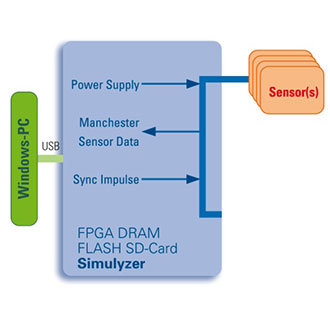
Test sensor interfaces without a physical sensor. Define signal sequences and communication parameters, then investigate how your system responds to errors and boundary conditions.
- CSV import in the GUI, arrays through the API
- CRC errors and physical layer tests
- Combine simulated and physical sensors
Challenge and solution
Sensor simulation in practice
Define signal sequences
Import CSV files into the standard GUI or pass arrays from your application to the API. Populate those arrays from your existing data sets.
Create specific boundary conditions
Inject communication errors such as CRC errors. The Sequencer can construct physical transmission waveforms, and communication parameters such as baud rates can be set outside the standard.
Configure protocol data
Alongside variable signal sequences, you can specify protocol-dependent constant values such as initialization data containing the sensor type, serial number or date.
Test options
Define reproducible signal behaviour
| Function | Capability |
|---|---|
| GUI or API | Configure using the standard GUI; supply sequences by CSV import or arrays in a custom application. |
| End-of-sequence behaviour | Continue transmitting the final value or repeat the sequence. |
| Physical and simulated sensors | Combine simulated sensors or slots with physical sensors. |
Test transceivers and evaluation software
Sensor simulation supports the development and validation of transceiver components and evaluation software. Targeted physical layer errors help investigate communication boundary conditions.
Products and development
Building blocks for your solution
The specific selection depends on interfaces, channel count and test requirements.
What would you like to test or develop?
Tell us about your sensors, interfaces and intended test sequence. Together, we can identify the hardware and software suited to your application.